Open Aviation Components
A good diagram or picture can be worth a thousand words, but being a still image that doesn’t change means it can at best imply how things change in response to time or other variables. For example, a diagram of the four forces acting on an aeroplane can identify those forces — but the moment a student asks what happens if I add power, or why do I need to pull back when turning is the moment that a second adjusted diagram is needed (or a thousand words in its absence).
A good video can demonstrate how things change over time, but the student is still unable to ask or interact with their own questions, to change different variables and reason about the result of their action. Helping students gain knowledge in a briefing is the easy part — bridging the gap between knowledge, comprehension and application is where so much training time gets spent.
The Open Aviation Components are small, free, interactive images or components designed to close that gap. Each one targets a single concept — force balance, axes of rotation, climb performance, airflow over a wing — and turns it into something a student can move, prod, and explore. You can drop them into a web-based ground briefing, embed them on a school’s website, or send a student a link to play with before a lesson.
Example components
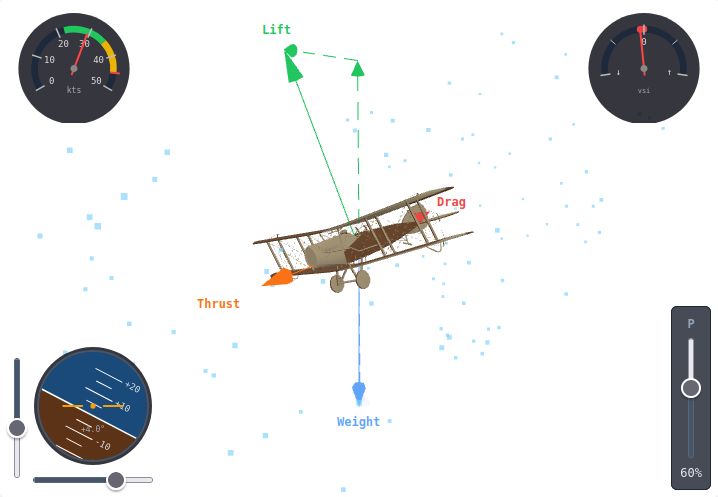
Section titled “Example components”The Four Forces component pictured above is a configurable interactive 3D aircraft with live lift, weight, thrust and drag arrows that grow and shrink as the student adjusts the power, attitude and bank of the aeroplane. Useful for understanding the power changes required as an aeroplane climbs, descends, turns and holds level flight, and for exploring what happens when the balance of forces breaks down. View the Four Forces component to try it out yourself.
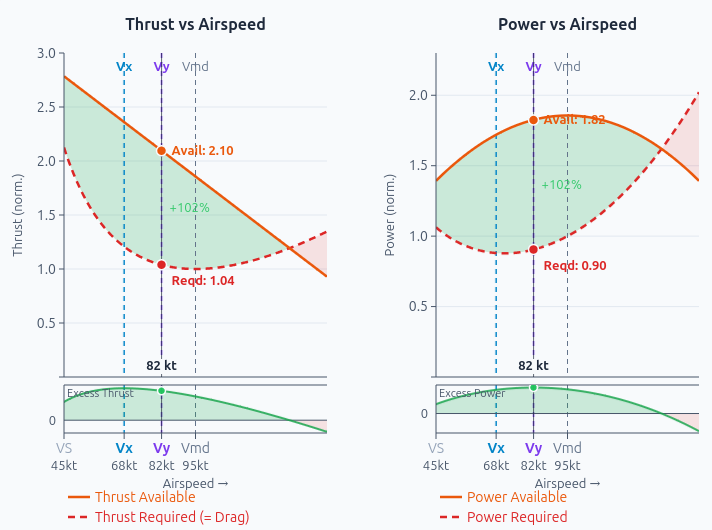
The Climb Performance component allows side-by-side thrust and power curves with a draggable cursor that snaps to Vx, Vy, Vmd, and the stall and maximum speeds. The shaded excess regions make it visible why best angle and best rate are different speeds — turning a numbers a student memorises into a relationship they can see.
The full library
Section titled “The full library”The full set of components, which will continue to grow over time, live on the Open Aviation Components documentation site. Each page on that site explains what the component does, how a student or instructor can use it, and (further down) how to embed it in your own materials.
Technically, the Open Aviation Component library is published both as software package and as individual script tags, so whether you build websites in a framework or write simple web-based slide decks by hand, you should be able to integrate them into your project with minimal effort. As an example, another Open Aviation Solution’s project, Open Aviation Briefings, uses these components throughout the slides, demonstrating how they can be used for briefing presentations.
Free to use and modify — improvements flow back
Section titled “Free to use and modify — improvements flow back”The components are licensed under the Mozilla Public License 2.0 — a per-file copyleft licence that lets you embed them anywhere (including commercial training materials) while ensuring that improvements to the components themselves flow back to the community. See the licensing page for the full picture.
How to contribute
Section titled “How to contribute”The source lives on GitHub at open-aviation-solutions/open-aviation-components. If you have an idea for a new component, spot a bug, or want to improve an existing one, get in touch — or, if you’re familiar with GitHub, open an issue or pull request.
If you are a school or training organisation interested in a custom component, branded styling, or your own aircraft in the 3D visualisations, please get in touch to discuss.