A 3D Circuit Diagram component for briefing circuits and joins
I’ve just been adding a new Circuit Diagram component to the free Open Aviation Components library last week, and I think it’s a great example of a small re-usable and open component that could benefit many aviation briefings. I’ll be updating my own RPL Open Aviation Briefings to use it in many different contexts with different paths.
Here’s an example, but note it’s just a frozen screenshot, click on it to view the actual 3D scene that you can manipulate and fly:
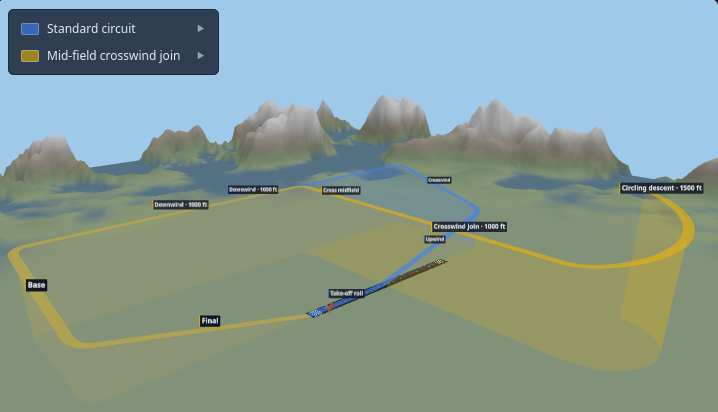
Circuit briefings spend a lot of time on geometry that’s genuinely hard to draw on a whiteboard: where the turns happen, how high you should be on each leg, and how one procedure differs from another against the same runway. A flat plan view loses the altitudes; a side view loses the ground track. This component keeps both — a 3D airfield you can orbit, where each procedure is a coloured ribbon following its own track and climb profile.
Drag to orbit, scroll to zoom, and use the legend to show or hide individual procedures so you can study one in isolation or overlay them for comparison. Press play next to a procedure to fly the camera along that track, pausing wherever you’d like to stop and talk something through.
What I like about this one
Section titled “What I like about this one”What I really like is how re-usable it is. A standard circuit, a flapless or glide approach, an overhead join, a mid-field crosswind join, even approach procedures — they’re all just paths against the same runway that can be displayed and labelled. Toggle them in the legend to highlight exactly how different paths differ, and label each leg with its target height in feet so students see the climb and descent profile, not only the ground track.
Similarly, the wind direction and strength can be configured (shown by the windsock), the terrain can be altered (it’s generated using a seed), the runway numbers can be configured to suite a specific scenario.
And, like every Open Aviation Component, it’s free to embed anywhere — your school’s website or a web-based ground briefing or any other web page. Anyone can drop it into their own briefings or slides, adapt the paths to their local aerodrome, and share the result. Improvements to the component itself flow back to the community under the same licence.
Try it out
Section titled “Try it out”Have a play with the live Circuit Diagram on the components site. That page also documents the coordinate system and the handful of attributes for defining your own paths, so with a little bit of html/web skills, you can build the joins and approaches you brief most often. For an overview of the whole library, see Open Aviation Components.
If you build something with it, or have an idea for another component, get in touch — I’d love to hear about it.